

Empower vs Mint isn’t a close call anymore, because Mint is gone. Intuit shut Mint down in 2024 and moved its users to Credit Karma, while Empower (formerly Personal Capital) still offers its free Empower Personal Dashboard for tracking your net worth, spending, and investment fees. If you have retirement accounts and investments to watch, Empower is the stronger pick. If you mostly budgeted in Mint, look at a budgeting app instead.
Personal Profitability may earn a commission from partner links on this page, at no cost to you. Partners don’t decide what we recommend or where it ranks. Fees are Empower’s as of 2026-10-31. Confirm them on Empower’s site before you open an account.
I used Mint from 2007 until Intuit pulled the plug. I’ve also used Empower since October 2012, back when the company went by Personal Capital. I last checked Empower’s tools and fee schedule on October 31, 2026.
Empower vs Mint at a glance
Mint was a budgeting app first, and Empower is an investment and net worth tracker first. That split still decides which one fits you, even with Mint out of the picture.
| Feature | Mint | Empower Personal Dashboard |
|---|---|---|
| Status in 2026 | Shut down in 2024, users moved to Credit Karma | Active |
| Price | Was free | Free |
| Budgeting | Category budgets with alerts, its best feature | Budgeting and cash flow tools, simpler than Mint’s |
| Net worth | A total under your account list | Front and center on the dashboard |
| Investment tools | Basic, with frequent errors in my accounts | Portfolio analysis, retirement planner, and Fee Analyzer |
| Paid advice | None | Optional Personal Strategy advisory service, $100,000 minimum |
Build a budget you'll keep this month
Get my free 2026 guide to picking categories, setting limits, automating your savings, and choosing a budgeting tool.
What happened to Mint?
Intuit closed Mint in 2024 and folded its users into Credit Karma, another Intuit product. Credit Karma announced on October 31, 2023 that Mint was going away and that Credit Karma would carry over some of Mint’s most popular features, including net worth tracking, spending monitoring, and cash flow.
In fact, Mint.com now sends you to Credit Karma. So the old Empower vs Mint question has turned into a new one: Empower or Credit Karma, or a paid budgeting app. Our roundup of Mint alternatives compares the budgeting apps.

What is Empower?
Empower bought Personal Capital and moved every Personal Capital product to the Empower name. The free dashboard Personal Capital users knew now goes by the Empower Personal Dashboard. On its financial tools page, Empower lists a retirement planner, net worth, budgeting and cash flow, portfolio analysis, a savings planner, debt paydown, an emergency fund planner, and transactions. Empower also lists the Fee Analyzer on its sign-up page, where you can read that the tools cost nothing. You can use the Fee Analyzer to find hidden fees in your investment accounts.
First, you link your bank, credit card, loan, and investment accounts. Then you can see every balance on one screen. Instead, Empower makes its money from the paid advisory side, which I cover below.
Budgeting: Mint was better, and Empower is good enough
Mint won on budgeting for as long as the app lived, though. When you signed up, Mint suggested a budget from your past spending. Then you could add categories and get an alert when you went over budget.
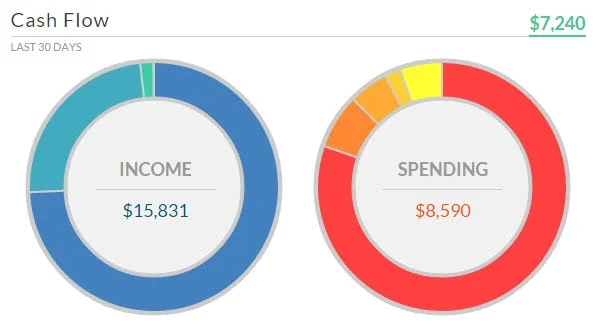
In contrast, Empower approaches spending like a business owner does, with cash flow. You see money coming in and going out each month. You can also set a monthly budget and watch your categories. If you want one spending target and a clear view of what’s left, Empower handles the job fine. If you set 20 category budgets every month, you’ll want a dedicated budgeting app like YNAB or Monarch Money.
Investment tracking: where Empower wins
Empower beats Mint on investments by a wide margin. Mint added investment tracking in October 2008, and in my accounts it never handled the basics well. For example, I watched Mint mislabel stock splits. Then one day Mint swapped a stock ticker for the nickname of my Schwab account.
Empower, on the other hand, built its tools for investors. Here’s what I use most:
- Portfolio analysis. You can compare your accounts against benchmarks, see your allocation by asset class, and test your risk level.
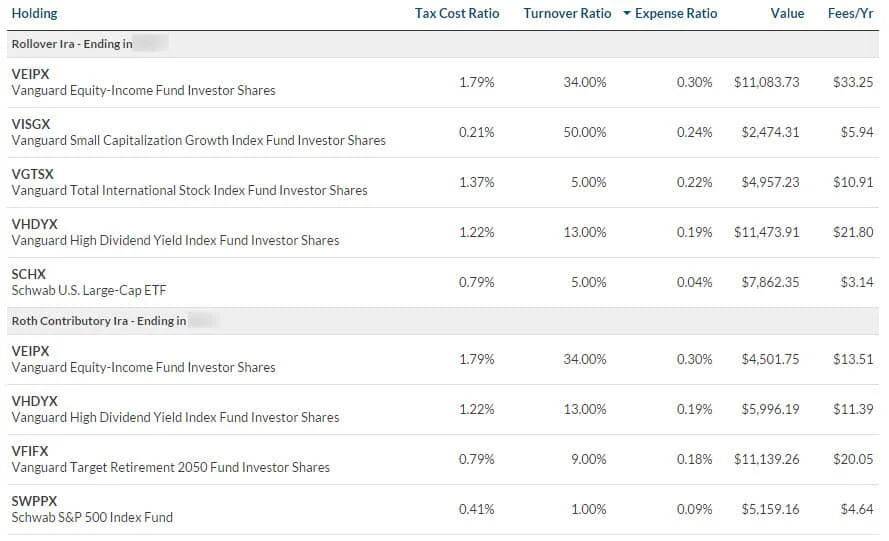
- Fee Analyzer. Empower scans your 401(k), IRA, and brokerage funds for expense ratios and advisory fees. After my first scan, I moved most of my retirement money into Vanguard and Schwab index funds. As a result, I cut my fees by more than $300 a year.
- Retirement planner. You can test what retirement looks like at different ages and with different savings rates, using the balances you already linked.
- Net worth. You see your assets minus your debts the moment you log in, updated from every linked account.
How much does Empower’s paid advice cost?
Empower charges nothing for the dashboard and 0.89% a year for its Personal Strategy advisory service on the first $1 million you invest. The minimum is $100,000. Empower lists these tiers on its Personal Strategy page:
| Service | Minimum | Annual advisory fee |
|---|---|---|
| Personal Strategy Investment Services | $100,000 | 0.89% |
| Personal Strategy Wealth Management | $250,000 | 0.89% |
| Private Client | $1 million | 0.79% on the first $3 million, 0.69% on the next $2 million, 0.59% on the next $5 million, and 0.49% above $10 million |
Empower also says its average ETF expense ratio runs 0.06%, and its advisory fee doesn’t include fund expenses. If you link accounts worth $100,000 or more, expect a call from an Empower advisor. I got one after a real estate sale pushed my balances over that line. The meeting cost me nothing, and you can say no and keep the free tools. With my background in corporate finance, I didn’t learn much new. Still, a free review can help you if you’ve never had one.
Is a 0.89% fee worth the money? That’s about $890 a year on every $100,000 you invest. Instead, you can buy an S&P 500 index fund for a tiny fraction of 0.89%. So pay for advice only if you’ll use the financial planning, tax help, and an advisor you can call.
Which should you use: Empower vs Mint’s replacements
So pick based on what you did in Mint every week.
- You tracked investments and net worth: Use Empower. You keep a free dashboard, and you gain the Fee Analyzer and retirement planner Mint never had.
- You checked balances and spending: Credit Karma, Mint’s official successor, or Empower both cover you for free.
- You set detailed category budgets: Try a paid budgeting app such as Monarch Money or YNAB. Our list of the best Mint alternatives has current prices.
I ran both apps side by side for years: Mint for the monthly budget and Empower for investments. Now that Mint is gone, I use Empower for the big picture and a simple spending plan for the month. If you want my full method, read our guide to personal financial statements.
Frequently asked questions about Empower vs Mint
Try the free Empower dashboard
If you have investments and retirement accounts, start with Empower’s free dashboard, link every account, and run the Fee Analyzer on your 401(k) and IRA first. That first scan saved me more than $300 a year. You can sign up for the Empower Personal Dashboard here.

Free guide
Build a budget you'll keep this month
Get my free 2026 guide to picking categories, setting limits, automating your savings, and choosing a budgeting tool.
- Set category limits from what you spend now.
- Try envelope, zero-based, and one-line budgets.
- Compare free and paid budgeting tools for 2026.
Bonus: The 30-Day Money Reset, a one-task-a-day plan to put your budget to work